The Moodle Newdle: Student Support
Dashboard
Online Learning & Educational Technology (OLET)
Join us online every Thursday 1-3 pm for a drop-in session
Welcome to our weekly BLOG: The Moodle Newdle. We’ll introduce you to some new Moodle features, as well as explore some of those you might have missed or forgotten. We hope to cover: communication, accessibility, multimedia, and more.
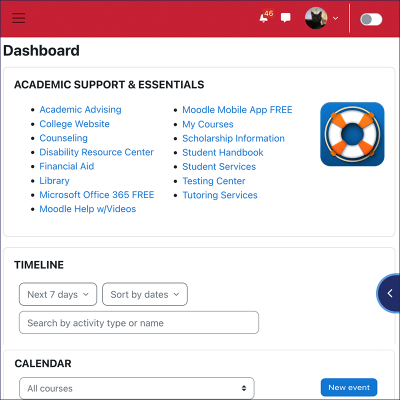
The Dashboard is your landing page, and it’s the first stop every time you log into Moodle. There you’ll see your most Recently Accessed Courses in the Block drawer, along with the Timeline, Calendar, and Academic Support & Essentials section (with quick links) on the main page. These quick links are especially valuable for students. Tutoring Services, Moodle Help w/Videos, and other key support services are only one click away, removing barriers and saving time when students need help most.
Pro Tip: You can customize the Moodle Dashboard to include all the resources you need. Once you’re in Edit mode, Add a block like Grade me and Private files. And if you ever want a fresh start, you can always reset your Dashboard back to the default layout.
Written by: DW Wood | Posted on: November 20, 2025 | View all
©2026 For questions on this blog entry, contact Online Learning & Educational Technology (OLET).