Sometimes you may have optional or hidden Moodle activities that show up in the User and Grader Report. This can cause course totals to not be accurate and confusion for students that are viewing the gradebook. We recommend that you follow these steps to create a hidden Not graded category to eliminate these issues.
Scroll to the top of the main page of your course.
Select the Grades option from the secondary navigation.
Select the Gradebook Setup option from the drop-down menu.

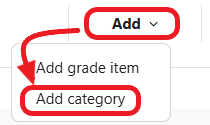
Select the Add category option from the Add drop-down menu.
For Category Name, enter the name Not graded.
For Aggregation, select Simple Weighted Mean of Grades from the drop-down menu.
Set the Maximum grade to 0 (zero).
Check the Hidden option.
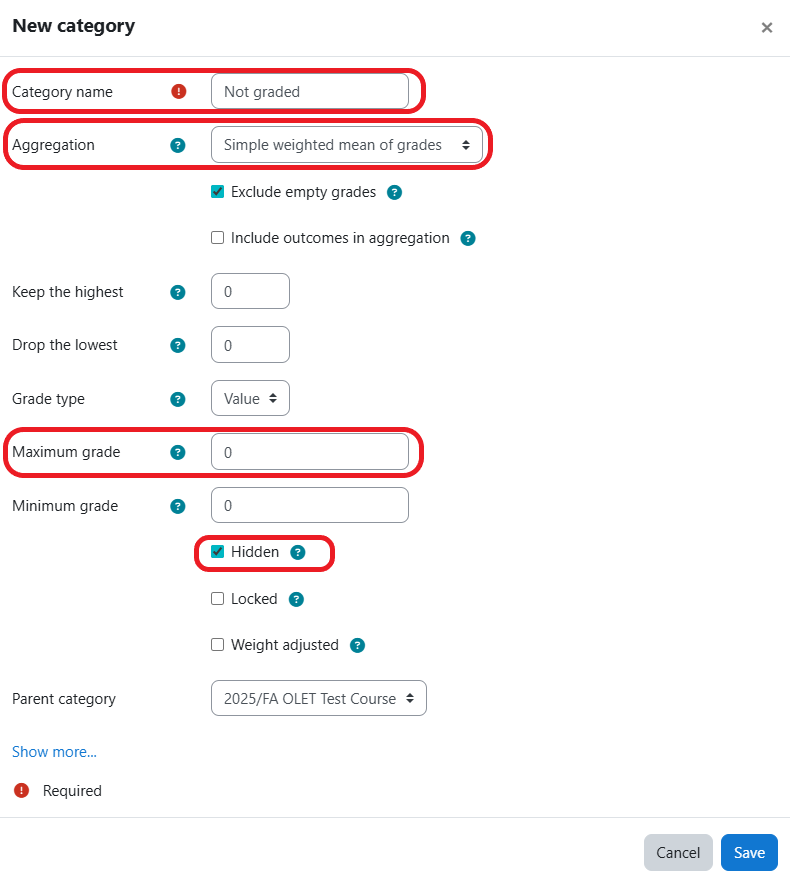
Click the Save button.

Move any non-graded items to the Not graded category.
Verify that your course total is correct.