Home > YuJa Panorama – Alternative Formats
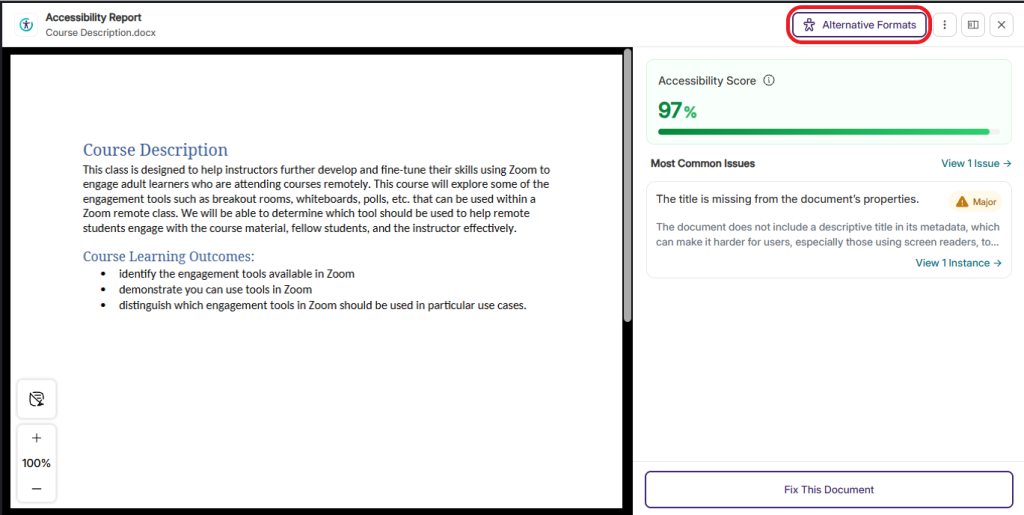
Panorama can generate alternative formats of content within your Moodle course for you and students.
NOTE: We recognize that there are situations where you would not want a student to access materials in a certain format (such as a language translator on a French Language Exercise). If so, please put in a ticket with OLET and we can turn off translations at the course level.
The program can generate the formats listed below:
- Source File – the documents in their original format.
- PDF – the document in PDF format.
- Text File – the document in a text format without any formatting.
- Immersive Reader – customized text with audio playback.
- Gradient Reader – gradated text.
- EPUB – the document in eBook format.
- Audio Podcast – audio playback.
- Language Translation – translate to over 100 languages.
- Math Formats – Convert math equations into LaTeX, Math Text , or audio playback.
- OCR – machine-coded text that can be searched and read by screen readers.
- Braille – the document in Braille format (a Braille reader is required).