In the gradebook, you can move grade items one at a time to a specific location or you can move multiple selected grade items to a gradebook category.
Move a Single Item in your Gradebook
Move items into an expected order (Assignment #1, Assignment #2, etc.) or move a single item elsewhere in the gradebook.
Scroll to the top of the main page of your course.
Select the Grades option from the secondary navigation.
Select the Gradebook setup option from the drop-down menu.

Click on the double arrow icon to the left of the item you want to move.
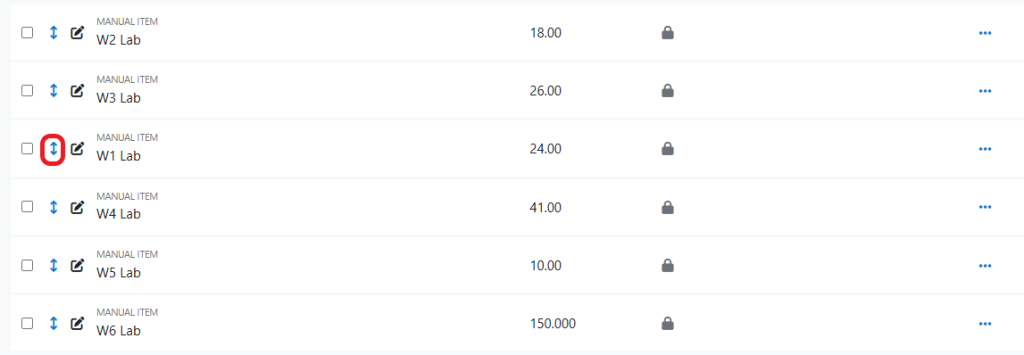
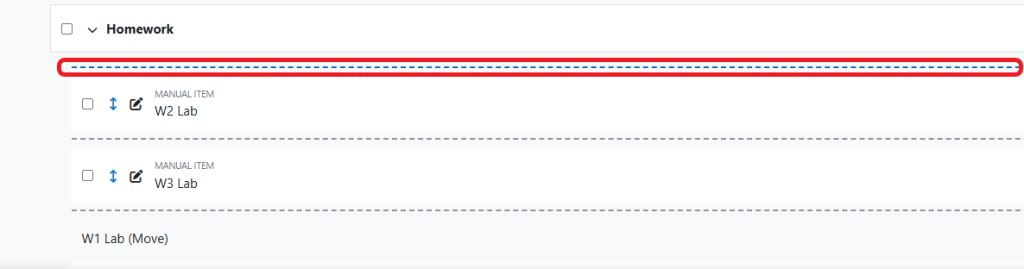
Dashed lines will appear between each item in the gradebook.
Select the one between the items where you want to relocate your selection.
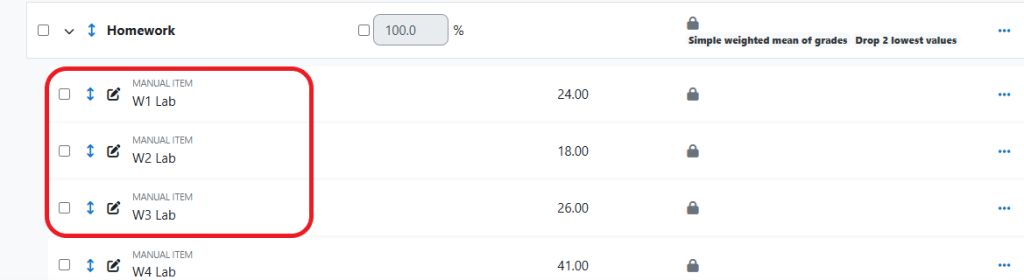
Confirm the changes are what you intended.
Repeat as desired.
Move Gradebook Items to a Category
Populate a new gradebook category with multiple grade items or move multiple grade items into an existing category.
Scroll to the top of the main page of your course.
Select the Grades option from the Secondary Navigation.
Select the Gradebook setup option from the drop-down menu.
Check the checkboxes in the left-most column of each item you wish to move into a given category.

Click the Move button in the footer.

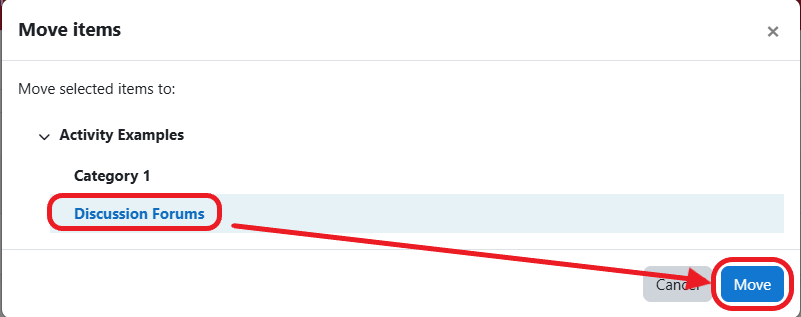
Select the category from the Move items pop-up.
Click the Move button.
Confirm the changes are as you expected.

Repeat as desired to populate or move the contents of your Gradebook categories.