These are some of the common issues that you might experience with an existing quiz.
Setting the Maximum Point value of a Quiz
There is not a place to enter the grade value under Quiz Settings as with most activities in Moodle.
Enter the Quiz you want to modify.
Select the Questions option from the secondary navigation.

On this page you will see the questions and some basic information about the quiz:
Total of Points: How many points all the questions add up to.
Maximum Grade: The value of the quiz that will appear in the gradebook.
If needed, edit the Maximum Grade and hit the save button to the right.
NOTE: If you do not want a quiz to affect student grades set the Maximum Grade to 0. Students can complete and review the quiz, but it will not appear in the gradebook.

Troubleshooting: Students Can’t See their Quiz Grade
A hidden grade item (student cannot see it) will appear with a closed eye icon in both the Grader report and Gradebook setup. Hidden grade items may result in inaccurate course total grades being displayed to students. Access the User report to determine how grades are being displayed to students.
Hidden Quiz in Grader Report (Instructor View)
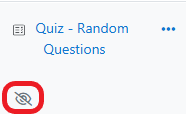
Hidden Quiz in Gradebook Setup (Instructor View)

Ensure Quiz is Visible to Students
If the Quiz activity is not visible to students then they will not be able to view the quiz int he gradebook either. To prevent students from accessing quiz questions you should modify the Close date and Review options settings instead of the availability setting.
Click the Edit menu (three vertical dots) to the right of the quiz.
Point to Availability to open another menu.
Select Show on course page.
NOTE: If you select Make available but don’t show on course page students can access the quiz through the gradebook, but will not see the link on the main course page.

Ensure Points is checked under Review Options
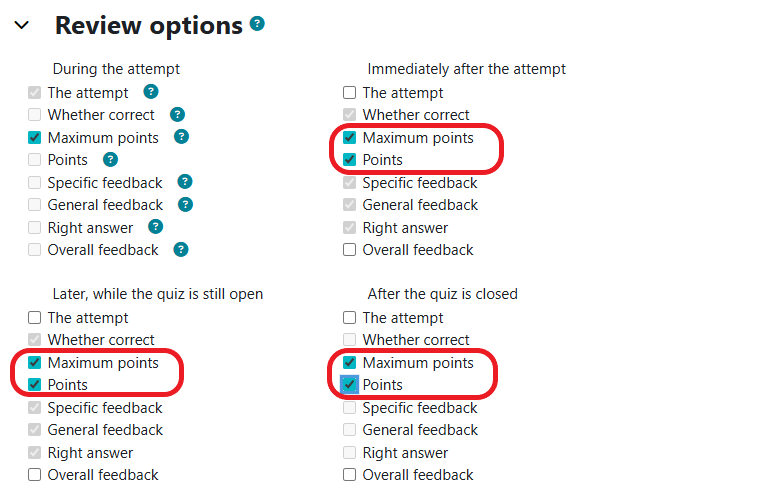
The Review options section allows you to determine what quiz results students can see and when they can see them. The area is grouped by four different times: During the attempts, Immediately after the attempt, Later, while the quiz is still open, and After the quiz is closed (only if you have a close date set for your quiz). You may decide to uncheck some of these items, but if you want the quiz to display in the gradebook make sure Points (or Marks) is checked.
Locate the Edit menu for the quiz in question and select Edit settings

Expand the Review Options section.
Verify that Maximum points and Points is checked for the time span you want it to appear in the gradebook.
NOTE: If your language preference in Moodle is set to English (en) you will see Marks instead of points.
Click the Save and display button at the bottom.
